Stock quantity override: When zero in stock, and when low inventory threshold is reached
Do you wish you could affect the static stock status settings in Shopify and WooCommerce? Now you can, in both M:AI product search and M:AI product recommendations!
2026-04-14
NEW!
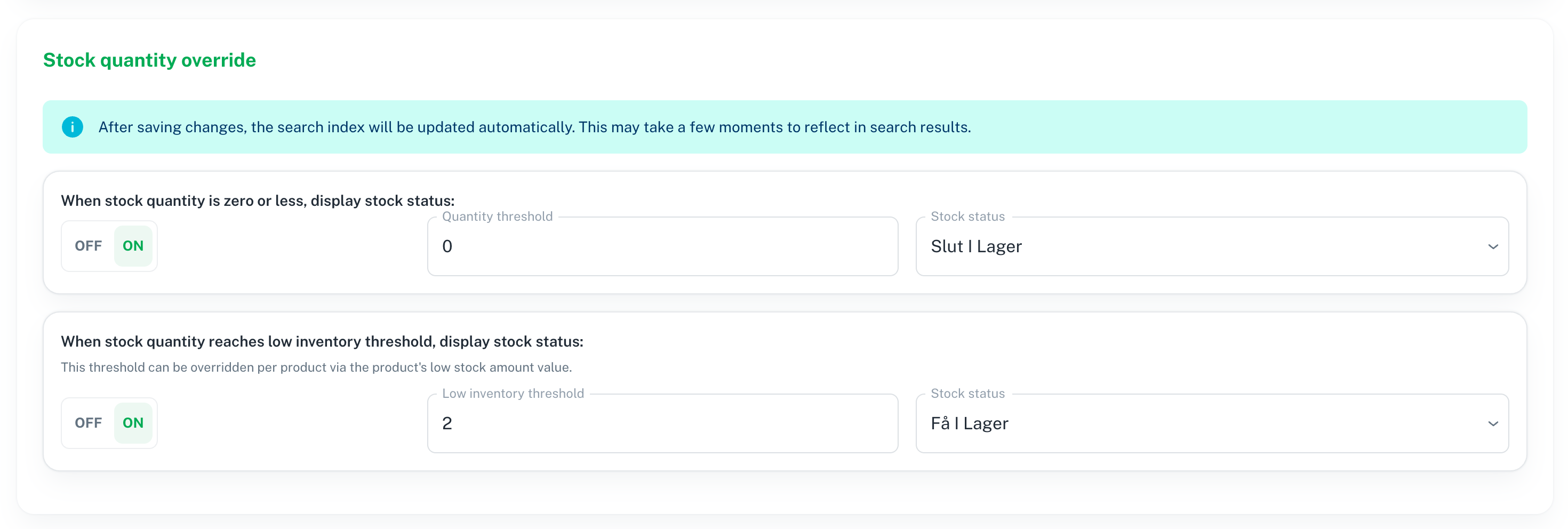
When stock quantity is zero or less, display another stock status i.e “Out-of-stock” even if stock status have not actually changed in your store.
When stock quantity reaches low inventory threshold i.e “2”, display another stock status i.e “Only few in stock” even if stock status have not actually changed.

Customer example - RCKONGEN.DK
With these settings:

The result in Storefront becomes this:

NEW!
Excluded collections
Now it’s easy to both manually, and automatically exclude non-wanted collections (Shopify) and categories (WooCommerce).
Manually exclude collections by selecting them here
Automatically exclude collections by setting unwanted collections in Shopify / WooCommerce that should not be displayed in the storefront, but you might want to keep anyway

Excluded by integration (automatically)
Go to M:AI admin > Collections to easily see which collections are excluded.

Excluded manually

Does your current search solution make sure you always get a PREMIUM service?
If not, talk to us:
Schedule a demo to see M:AI platform:
https://meshnordic.ai/book-demo